A buddy list for your work.
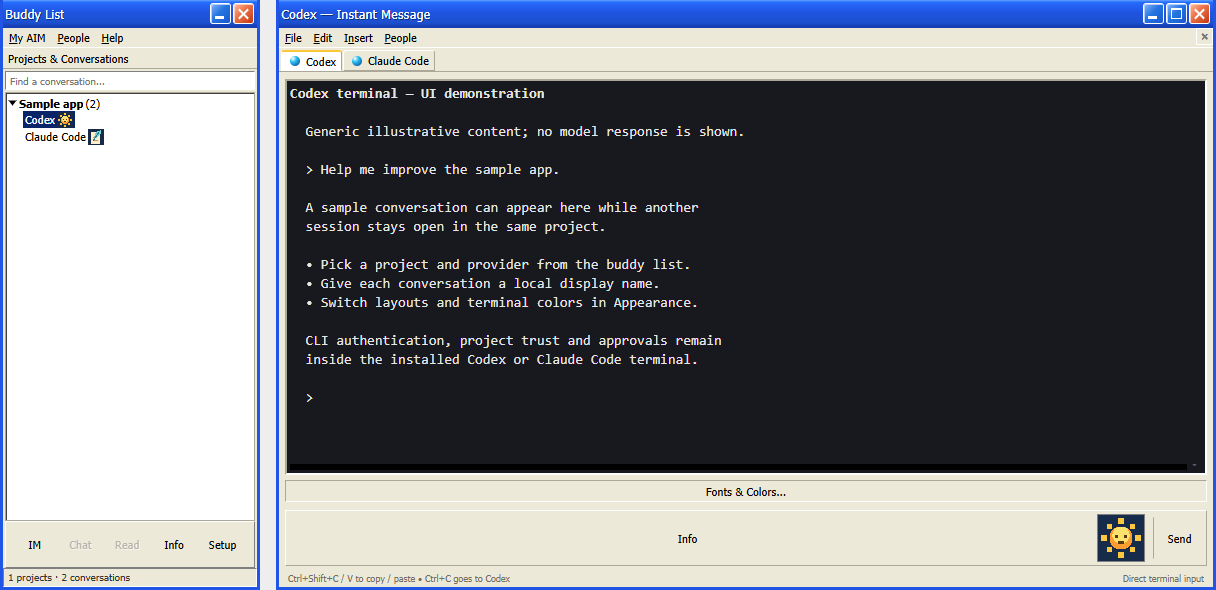
Projects become groups. Conversations become buddies. Keep your coding sessions together and give each one a name that makes sense to you.
BuddyAIM — Buddy Agent Instant Messenger
A classic messenger interface for your coding CLIs.
Bring Codex and Claude Code together in one familiar desktop. Organize projects, start conversations, and pick up where you left off—all from your buddy list.
Prebuilt Windows downloads available on GitLab.
Old-school comfort. Today's tools.
Projects become groups. Conversations become buddies. Keep your coding sessions together and give each one a name that makes sense to you.
Work in real embedded terminals for Codex and Claude Code. Your installed tools continue to handle sign-in, project trust, and approvals.
Choose AIM, DeadAIM, or Pidgin styling. Set a light, dark, or custom terminal palette, and switch the surrounding interface without restarting your sessions.
The person behind the buddy list
BuddyAIM was created by an elder millennial who remembers when a screen name, a buddy list, and an away message were enough to feel connected.
It comes from a fondness for the old web: personal pages, small communities, and conversations that didn’t need a feed. Before so much of online life gathered behind the same few walled gardens, the web felt more like a place we made our own. BuddyAIM is a small way of keeping that feeling alive in the tools we use today.
A few things to know
buddyAIM is a desktop home for coding agents. It does not connect to the AIM network or send messages to other people. The buddy list organizes your projects and coding conversations.
Yes. Install and sign in to a supported native Codex or Claude Code CLI first. buddyAIM hosts those tools; their accounts and service requirements still apply.
buddyAIM can find saved local conversations from both providers and open them in their projects. Provider features differ: automatic reply cues and approval attention currently require compatible Codex structured events.
You can use the prebuilt Windows x64 installer or ZIP, or clone the repository and run from source with Node.js and npm. Both options need an independently installed Codex or Claude Code CLI. Find downloads and installation details in the latest GitLab release.
These are captures of the application using generic demonstration conversations and the public artwork. They do not contain live model responses. You may see the earlier development name, Codex AIM, while the buddyAIM branding is being finalized.